
How do I set up a Buy X, get Y offer in a bundle?
Updated · SMART Bundles App & Upsells (E-TRADE PARTNER)
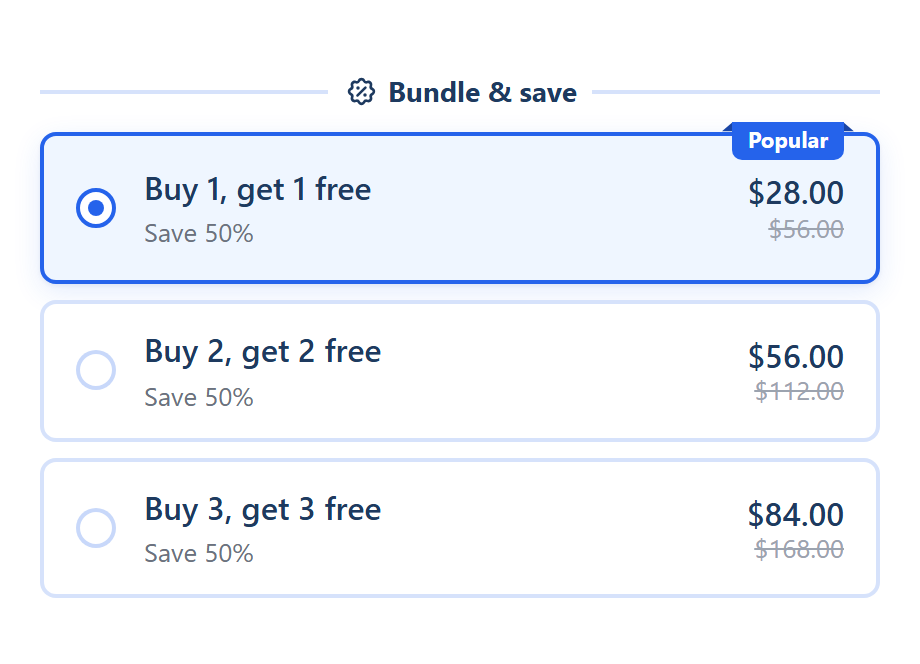
Create a bundle from the Buy X, get Y template, or add a Buy X, get Y offer to any bundle, and set Buy quantity, Get quantity and the discount (Free by default). The offer is always the same product: the card adds buy + get units to the cart, and checkout discounts the cheapest units of each complete set.
SMART Bundles App & Upsells is a free Shopify app for bundles, quantity breaks, free gifts and upsells.
Try it freeOn this page
Set it up
- In SMART Discounts, click Create new discount and pick Buy X, get Y. The template has three offers: Buy 1, get 1 free; Buy 2, get 2 free; Buy 3, get 3 free.
- On the Offers tab, set Show this bundle on to the products the offer runs on. See Target products and exclusions.
- Open an offer and set Buy quantity and Get quantity. To add one, click Add another offer and choose Buy X, get Y ("Buy N, get M more of the same product free or at a discount").
- Choose the Discount for the get units: Free (the default), Percentage off, Amount off each item, Amount off total, Fixed price per item or Fixed total price, then the Value.
- Keep or untick Repeat for bigger quantities (on by default).
- Edit the texts. A new offer starts with the title "Buy {{buy_quantity}}, get {{get_quantity}} free" and the subtitle "Save {{saved_percentage}}%".
- Click Create or Save and check the product page.
How checkout prices it
- Same product, variants together. Units are counted per product, so a shopper can mix sizes or colors of that product.
- Whole sets only. A set is buy + get units. Buy 1, get 1 with 5 units in the cart makes 2 sets, so 2 units are discounted and the fifth pays full price.
- Cheapest units first. When the variants have different prices, the cheapest units in the cart get the discount.
- Repeat for bigger quantities. Ticked, every full set counts: Buy 1, get 1 with 4 in the cart gives 2 free, with 6 gives 3 free. Unticked, only 1 set is discounted however many are added.
- Total types work per set. Amount off total takes the amount off once per set. Fixed total price sets the get units of each set to that total price. Neither raises a price.
- The card adds both. Picking the offer adds buy + get units of the product through your theme's Add to cart button. The free units are ordinary units of the same product, not separate gift lines.
With other offers in the same bundle
- Items added through a Buy X, get Y card count only for that offer. They never also reach a quantity break tier.
- Items added another way, such as the theme's button or a collection quick add, go to the bundle's quantity breaks or mix and match first. Buy X, get Y only takes products those offers didn't discount.
- Two Buy X, get Y offers never stack on the same units: such items go to the one offer that discounts the most units.
Options and limits
- This offer kind has no Show quantity selector. Add one offer per set size instead.
- Pick a variant for each unit (Settings tab > Variant pickers) works, so each unit can be a different variant. See Variant pickers.
- Allow subscription works while the Subscriptions extra is on. See Subscriptions in a bundle.
- To give a different product, add a gift to the offer with Add gift, or an upsell. See Progressive gifts and Upsell add-ons.
Not the same as the Buy X get Y discount type
Under Other discount types, Buy X get Y is a cart discount with nothing on the product page, and customers add the Y items to the cart themselves. Use it when the free item is a different product the customer picks. See Buy X get Y discounts and Buy X get Y free item not added.
More on the offer: Buy X, get Y and BOGO on Shopify.
Run Buy 1, get 1 on your product pages
SMART Bundles App & Upsells is free on the Shopify App Store, with every offer type in one plan.
Install free on ShopifyFrequently asked questions
›Is the free item added to the cart automatically?
Yes. The card adds buy + get units of the same product when the shopper clicks Add to cart, and checkout discounts the get units.
›A customer added 4 but only 1 was free. Why?
Repeat for bigger quantities is unticked on that offer, so only one set is discounted. Tick it to discount every full set.
›Can the free item be a different product?
Not in this offer kind. Add a gift to the offer with Add gift, or use the Buy X get Y discount type.