
How to run BOGO and "buy 2 get 1 free" on Shopify
Updated · SMART Bundles App & Upsells (E-TRADE PARTNER)
Use Shopify's built-in Buy X get Y discount: put the product under both "Customer buys" and "Customer gets", set the quantities and choose Free. Customers add every unit themselves, Shopify discounts the lower-priced item, and nothing shows on the product page. SMART Bundles adds two other ways: a Buy X, get Y bundle offer that shows the deal on the product page and adds the whole set in one click, and a cart-only Buy X get Y discount type.
SMART Bundles App & Upsells is a free Shopify app for bundles, quantity breaks, free gifts and upsells.
Try it freeOn this page
BOGO with Shopify's Buy X get Y
- In Shopify admin, go to Discounts > Create discount > Buy X get Y, and choose a discount code or an automatic discount.
- Under Customer buys, select Minimum quantity of items, enter how many the customer buys, and pick the product or collection.
- Under Customer gets, enter how many items get the discount and pick the same product or collection. For BOGO that's buy 1, get 1; for "buy 2 get 1", buy 2, get 1.
- Under At a discounted value, select Free, or Percentage for "buy 1, get 1 at 50% off".
- Optional: Set the maximum number of uses per order to cap how many times the promotion applies to one order. By default it's unlimited.
- Set eligibility, combinations and active dates, then save.
Source: Buy X get Y discounts. When the product or collection is the same on both sides, the lower-priced item the customer chooses gets the discount. Shopify's page doesn't spell out how it counts units when both sides are the same product, so test your setup with a real cart before launch.
Limits of the built-in discount
- Customers add every unit. The "get" item is never added automatically. A shopper who adds one item for a BOGO sees no discount. Why, and the fixes: Why Shopify's Buy X get Y doesn't add the free item.
- Nothing on the product page. The deal shows once the items are in the cart, so you have to advertise it yourself.
- No other product discount on those items outside Shopify Plus. If a code also targets them, Shopify applies the best overall discount (Combining discounts).
- Minimum amounts use full prices, before other discounts, and never include shipping or taxes.
- POS: an automatic Buy X get Y applies only at locations with a POS Pro subscription, once you turn it on for POS (Managing sales channel settings for discounts).
BOGO with SMART Bundles: two different tools
SMART Bundles (shown as SMART Discounts in Shopify admin) has a bundle offer named Buy X, get Y and a discount type named Buy X get Y. The names are close; the behavior isn't.
1. The bundle "Buy X, get Y" offer (product page)
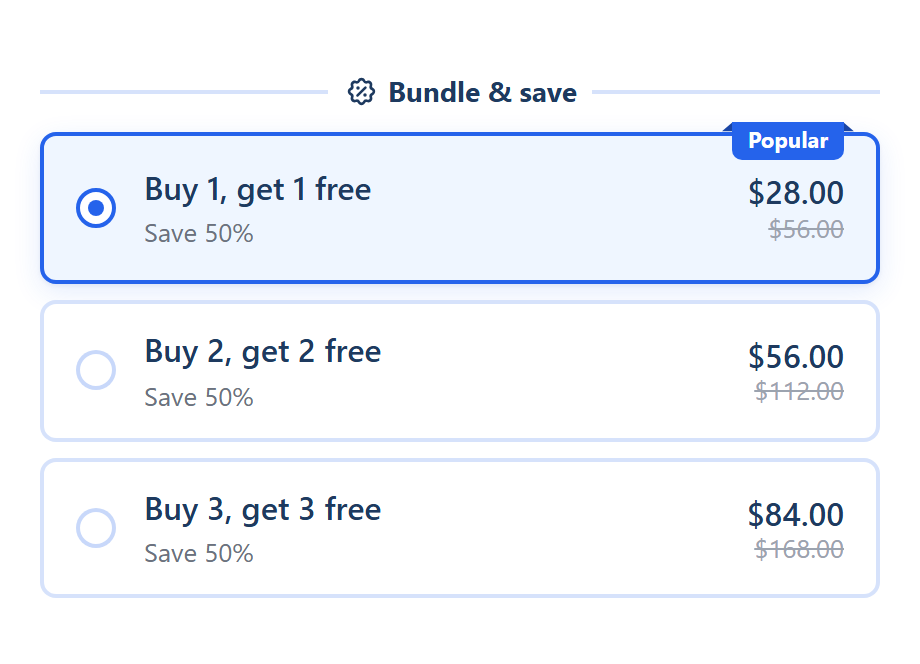
This one lives in the product page widget. The Buy X, get Y template has three offer cards: "Buy 1, get 1 free", "Buy 2, get 2 free" and "Buy 3, get 3 free". When the shopper picks a card, the theme's Add to cart button adds the buy and get units together.
- Same product only. It's always the product on the page, and its variants count together.
- Fields: Buy quantity, Get quantity and the discount for the get units: Free (the default), Percentage off, Amount off each item, Amount off total, Fixed price per item or Fixed total price. For "buy 2 get 1", set Buy quantity 2 and Get quantity 1.
- Whole sets. A set is buy + get units. The Function counts the units of that product in the cart and discounts the get units of each complete set, choosing the cheapest units.
- Repeat for bigger quantities is ticked by default: with buy 1 get 1, 4 in the cart get 2 free. Untick it and only one set is discounted, however many are added.
- The cart counts, not the click. Units added another way still form sets, unless you tick Apply the discount only to items added through the widget.
- Several Buy X, get Y cards never stack on the same units. Each unit counts for one offer only.
- Automatic only: no code, no usage limit, no once per customer. You can limit it by Markets and exclude B2B or POS.
Setup: Buy X, get Y bundle offer.
2. The "Buy X get Y" discount type (cart and checkout)
This one is under Other discount types on Create new discount. It works like Shopify's: nothing on the product page, and the customer adds the Y items.
- Customer buys: Any items from Products, Variants, Collections or All products (or "other than" each), Based on Product quantity or Product price, with a Required quantity or Required amount.
- Customer gets: the items and a Free quantity. Every discounted item is free; this type has no percentage or amount off.
- Units on both sides count twice. When the same product is under Customer buys and Customer gets, its units count toward the required quantity too. One-product BOGO is Required quantity 2 and Free quantity 1; "buy 2 get 1" is 3 and 1.
- One tier applies, with no repeats per set. If several tiers qualify, the one that frees the most units wins. For BOGO on bigger carts, use Add tier: 2 and 1, 4 and 2, 6 and 3.
- Application order picks which items get the discount: Default cart order, Lowest priced first or Highest priced first.
- Codes and targeting: automatic or code, Maximum discount uses for codes (including one use per customer), customer segments, markets, customer tags and countries.
Setup: Buy X get Y discounts.
Side by side
| Shopify Buy X get Y | SMART bundle "Buy X, get Y" offer | SMART "Buy X get Y" type | |
|---|---|---|---|
| Shown on the product page | No | Yes, as offer cards | No |
| Adds the free units | No | Yes, buy + get in one click | No |
| Products | Products or collections | The page's product only | Products, variants, collections or all |
| Bigger carts | Can apply more than once; cap with maximum uses per order | Repeats per full set (default) | One tier; add a tier per step |
| Which units are discounted | The lower-priced item the customer chooses (same product or collection) | The cheapest units of each set | Set by Application order |
| Codes | Yes | No, automatic only | Yes |
| Customer targeting | Customers, segments, markets | Markets; exclude B2B, POS | Segments, markets, tags, countries |
Which one to use
- One product, shown on its page, added in one click: the bundle Buy X, get Y offer.
- A free item from a different product or collection: the Buy X get Y type, or a gift on a bundle offer if it should be added for the shopper. See Buy X get Y.
- A code, a usage limit or customer segments: the Buy X get Y type, or Shopify's built-in discount.
- A gift added on any page once the cart reaches a spend: Free gift, see Free gift.
Show BOGO on the product page
Install SMART Bundles App & Upsells, pick the Buy X, get Y template, and shoppers add the whole set in one click. The app is free.
Install free on ShopifyFrequently asked questions
›Can a BOGO be limited to once per customer?
Only with a code. Shopify's built-in codes have Limit to one per customer, and the app's Buy X get Y type has the same option under Maximum discount uses. Bundle offers are automatic, so they have no per-customer limit.
›Can I run several BOGO promotions at once?
Yes. Each one is its own discount, and Shopify allows 25 active automatic discounts in total. A bundle with three Buy X, get Y cards counts as one.
›Does BOGO work with a discount code?
Outside Shopify Plus, items in a Buy X get Y discount can't get another product discount. An order discount code can apply on top when both discounts allow combining with each other.