
Buy X, get Y: BOGO on the product page and in the cart
Updated · SMART Bundles App & Upsells (E-TRADE PARTNER)
SMART Bundles has two ways to run Buy X get Y. The bundle's Buy X, get Y offer shows tiers such as Buy 1, get 1 free on the product page and adds all the units in one click. The Buy X get Y discount type works only in the cart and at checkout, across products, variants or collections, and customers add the Y items themselves.
SMART Bundles App & Upsells is a free Shopify app for bundles, quantity breaks, free gifts and upsells.
Try it freeOn this page
The two options side by side
| Bundle offer "Buy X, get Y" | Discount type "Buy X get Y" | |
|---|---|---|
| Shows on the product page | Yes, as offer cards | No, cart and checkout only |
| Products | The product on the page, variants together | Customer buys and Customer gets: products, variants, collections or all products |
| Adds the Y items to the cart | Yes, buy and get units in one click | No, customers add them |
| Bigger carts | Repeats per full set (Repeat for bigger quantities) | One tier applies; add more tiers for more |
| Automatic or code | Automatic only | Automatic or Code |
| Who gets it | Markets; can exclude B2B and POS | All customers, Customer segments or Markets, plus customer tag and country conditions |
The bundle offer: BOGO on the product page
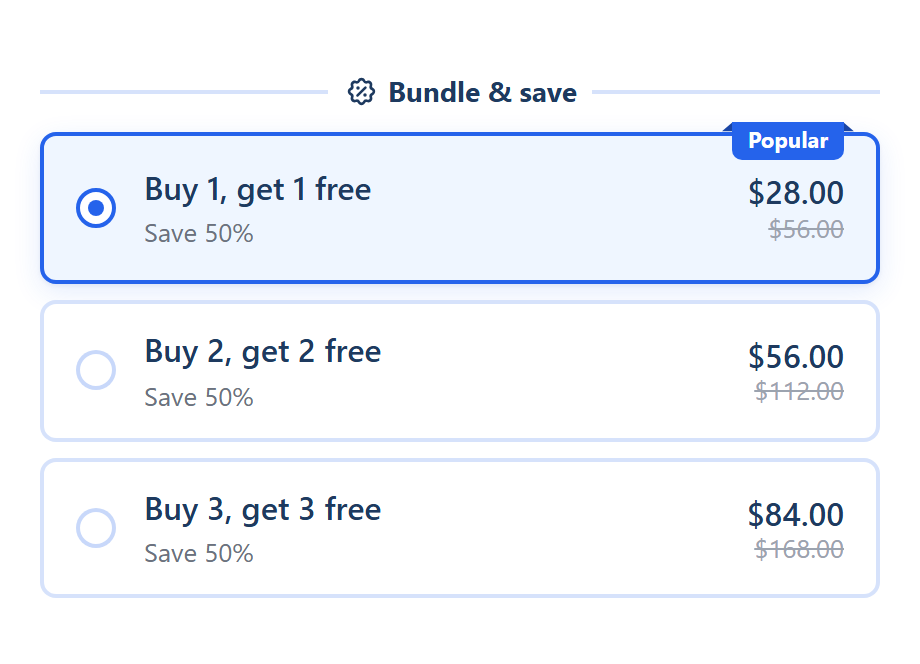
- What the shopper sees: cards such as "Buy 1, get 1 free" with a "Save 50%" line. The Buy X, get Y template starts with three: Buy 1, get 1 free (pre-selected, badge "Popular"), Buy 2, get 2 free and Buy 3, get 3 free.
- One click adds the whole set. Picking a card and clicking your theme's Add to cart adds the buy and the get units of the page product. With Pick a variant for each unit (on by default), each unit gets its own variant picker, so the units can be different colors or sizes.
- Fields: Buy quantity, Get quantity and Discount: Free (the default), or a percentage, an amount or a fixed price for the Y units.
- Repeat for bigger quantities is on by default. The editor's example: "Buy 1, get 1: 4 in the cart get 2 free. Unticked, only 1 is free however many are added."
- How it's priced: every full set of buy + get units in the cart counts, and the cheapest units of the set get the discount. Variants of one product count together, and each product counts on its own.
- No double discounts. Units that a Quantity breaks or Mix and match tier of the same bundle already discounts are left to that tier.
- A different product as the gift? Use Add gift on the card instead. The gift is added to the cart with the offer. See Free gift.
The discount type: Buy X get Y in the cart
Find it under Create new discount > Other discount types > Buy X get Y. It was called "Gift with purchase" before; existing discounts kept working unchanged.
- Based on: Product quantity or Product price (an amount spent).
- Customer buys and Customer gets, each with Any items from: Products, Products other than, Variants, Variants other than, Collections, Collections other than or All products. Each side has a Purchase type (Any, One time purchase, Subscription purchase).
- Exclude products with compare at price (already on sale).
- Tiers, up to 10: Required quantity (or Required amount), Free quantity and Discount label. The Y items a tier covers are always free.
- Application order: Default cart order, Lowest priced first or Highest priced first decides which Y units get the discount.
- One tier applies: the reached tier that frees the most units. It doesn't repeat, so for 2, 3 or more free items add a tier for each step.
- Same product on both sides: items count toward X too. For buy 1, get 1 on one product, set Required quantity 2 and Free quantity 1.
Customers add the free item
The editor says so at the top: "Customers add the Y items to the cart themselves. To add a gift for them automatically, use Free gift." Shopify's own Buy X get Y works the same way: the get item "is never automatically added to the cart" (Shopify Help Center).
Like the other cart discount types, it has Application method (Automatic or Code, fixed once created), Maximum discount uses for codes, Eligibility, Conditions (customer tags and countries), Purchase types, Combines with and Active dates. More in Cart discounts.
Which one to use
- BOGO on one product, shown on its page: the bundle offer.
- Buy from one collection, get from another, a choice of free items, single variants, a code or customer segments: the discount type.
- A gift that lands in the cart by itself: Free gift, or a gift on a bundle offer.
Limits
- The bundle offer is the page product only. For a different product at a price, add a gift or an upsell to the card.
- Bundles are automatic. No codes, usage limits or customer tag targeting on the bundle offer.
- The discount type shows nothing on the product page and never adds items.
- 25 automatic discounts. Shopify allows at most 25 active automatic discounts per store, app discounts included (Shopify Help Center).
How to set it up
- Bundle offer: turn on the SMART Discounts app embed (Deal widget under App embeds), then in SMART Discounts click Create new discount, choose the Buy X, get Y template, set Show this bundle on and click Create.
- Discount type: click Create new discount, choose Buy X get Y under Other discount types, fill in Customer buys, Customer gets and the tiers, then click Create.
Step-by-step help: Buy X, get Y bundle offer, Buy X get Y discounts, Automatic or code, and schedules and Turn on the app embed.
Related guides
- How to run BOGO and buy 2 get 1 on Shopify
- Why Buy X get Y doesn't add the free item
- How to combine discounts on Shopify
Run your first BOGO
Install SMART Bundles and choose the Buy X, get Y template for the product page, or the Buy X get Y type for the cart. Both are free.
Install free on ShopifyFrequently asked questions
›Why isn't the free item added to the cart?
The Buy X get Y discount type only discounts items already in the cart, like Shopify's own. To add the item for the shopper, use the bundle's Buy X, get Y offer, a gift on a bundle offer, or Free gift.
›Does Buy 1, get 1 free also work for 4 items?
In the bundle offer, yes: with Repeat for bigger quantities on, 4 in the cart get 2 free. The discount type doesn't repeat, so add a tier for each step (Required quantity 4, Free quantity 2, and so on).
›Can the free item be a different product?
Yes, with the discount type: put that product in Customer gets. On the product page, add it to a bundle offer as a gift instead.