
Free gift: add a gift to the cart automatically
Updated · SMART Bundles App & Upsells (E-TRADE PARTNER)
The Free gift discount in SMART Bundles adds a gift product to the cart by itself when the cart reaches a spend or item tier, or while a discount code is on the cart. It works on every page of your store, removes the gift when the cart stops qualifying, and makes the gift free only while it's earned.
SMART Bundles App & Upsells is a free Shopify app for bundles, quantity breaks, free gifts and upsells.
Try it freeOn this page
What the shopper sees
- The gift appears in the cart as its own line, at the tier's Free quantity. At checkout it carries your Checkout label ("Free gift" unless you change it).
- No reload, no pop-up. The app updates the cart page and the cart drawer quietly and never opens the drawer for a gift.
- It stays honest. If the cart drops below the tier, the gift line is removed. A raised gift quantity is set back to the free quantity.
- The shopper's choice counts. If a shopper deletes the gift, it isn't added again while the tier stays reached.
- Checkout waits for the cart. When the shopper clicks checkout during a cart update, the app holds the click for a moment so the gift is right.
Settings
| Card | Options |
|---|---|
| Discount name | A name only you see. Application method: Automatic or Code, fixed once the discount is created. |
| Trigger | Cart value or Items in cart. Optional Maximum cart value or Maximum items: "No gift above this. Applies to every tier." |
| Counts toward the tier | All products or Specific products, with Require all of these products for a gift that needs every listed product. |
| Gift tiers | Up to 5 tiers (a code discount has 1). Each has a minimum, a Gift product and one Variant, a Free quantity of 1 to 10, a Gift price (Free, Percentage off or Fixed price) and a Checkout label. Higher tier replaces lower is on by default. |
| Eligibility | All customers, Customers with any of these tags or Customers without these tags; New customers only ("Guests count as new customers."); Markets. |
| Maximum discount uses | Code discounts only: a total limit and Limit to one use per customer. |
| Combinations | Product, order and shipping discounts, all ticked by default. |
| Active dates | A start and an optional end. |
How tiers are counted
- Cart value adds up item prices before discounts. Items in cart adds up units. Gift lines never count toward a tier.
- Several tiers. With Higher tier replaces lower on, only the highest reached tier's gift is in the cart. Untick it and every reached tier adds its own gift.
- Other currencies. Amounts are entered in your store currency and converted for shoppers who pay in another one. If you sell in several currencies, the globe button next to a minimum, maximum or fixed price sets your own amount per currency.
- One gift per tier. Each tier gives one variant you choose; shoppers can't pick between gifts.
Free gift with a discount code
Choose Code when you create it. The gift is then added while the code is on the cart: entered in a cart discount field, if your theme has one, or through a /discount/CODE link. Leave the minimum empty to give the gift for the code alone. A code typed only at checkout doesn't add the gift, because the gift is added in the cart, before checkout.
How the gift becomes free
- The app's script adds and removes the gift line. Its Shopify Function makes only that line free (or discounted) while the tier is reached. Keep the gift product's real price.
- A gift added by hand to a cart that doesn't qualify keeps its full price.
- If another product discount wins the gift line, the app removes the gift instead of letting it be charged. Combining needs both discounts to allow it (Shopify Help Center).
Where the gift can't be added
- Buy it now and other buttons that go straight to checkout skip the cart, so no gift is added.
- A code typed only at checkout.
- Shopify POS: a Free gift is never applied there.
- Headless storefronts and checkouts that replace Shopify's own. The gift needs your Online Store theme with the SMART Discounts app embed on (Deal widget under App embeds).
- A gift product that isn't active on the Online Store sales channel. The editor warns you when that's the case.
There is no progress bar or "spend X more" message for Free gift. Inside a bundle widget, the Progressive gifts ladder has one.
Gifts inside a bundle
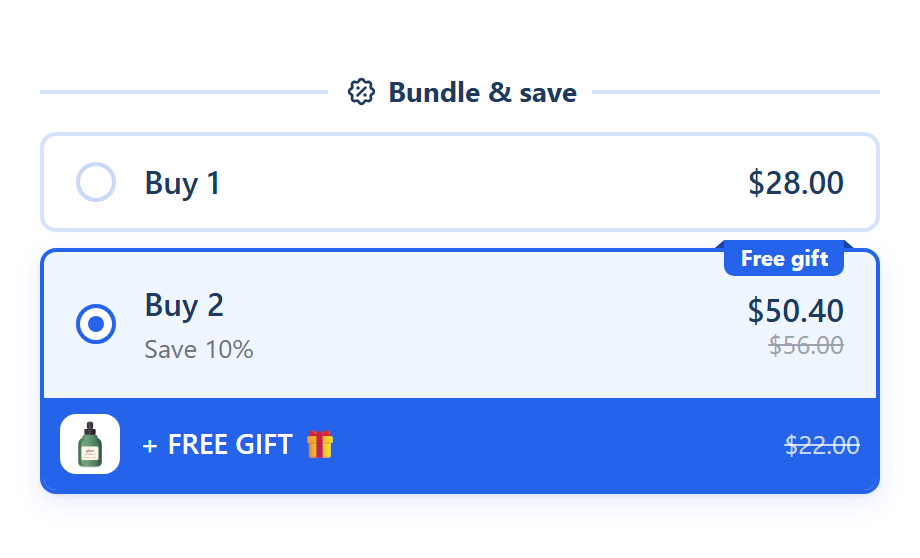
- A gift on an offer. In a bundle, Add gift on an offer card adds a gift product that goes to the cart with that offer, shown on the card as "+ FREE GIFT 🎁". The Bundle with a free gift template puts one on its Buy 2 tier.
- A gift ladder. Progressive gifts on the Extras tab unlocks gifts or free shipping by offer or spend, with a progress line. See Upsells and extras.
- Customers add it themselves. The Buy X get Y discount type discounts an item the customer adds. See Buy X, get Y.
How to set it up
- Turn on the SMART Discounts app embed in your theme editor (App embeds > Deal widget). See Turn on the app embed.
- In SMART Discounts, click Create new discount and choose Free gift under Free gifts.
- Name it, pick Automatic or Code, set the Trigger and what Counts toward the tier.
- Add a tier: the minimum, the gift product and variant, the free quantity. Click Create.
- Test it in your store: add products until the tier is reached and check the gift line in the cart.
Step-by-step help: Set up a free gift, Free gift tiers, Free gift with a discount code and Free gift not added to the cart.
Related guides
- Free gift with purchase tiers on Shopify
- Why Buy X get Y doesn't add the free item
- How to combine discounts on Shopify
Put a gift in the cart automatically
Install SMART Bundles, create a Free gift and set your first tier. Free, with every feature included.
Install free on ShopifyFrequently asked questions
›Can customers choose their free gift?
Not with Free gift: each tier adds one variant you choose. For a choice, use the Buy X get Y discount type with every option in Customer gets; the customer adds the one they want.
›What if the customer removes the gift?
It isn't added back while the cart stays at that tier. If the cart drops below the tier and reaches it again, the gift is added again.
›Does the gift count toward my other discounts' thresholds?
It can, because it's a normal cart line. In an Order goal, add the gift product to Products excluded from discount to keep it out.
›Can I give more than one gift at the same amount?
Two tiers can't share a minimum. Create a second Free gift with the same trigger for a second gift.