
How do subscriptions work in a bundle?
Updated · SMART Bundles App & Upsells (E-TRADE PARTNER)
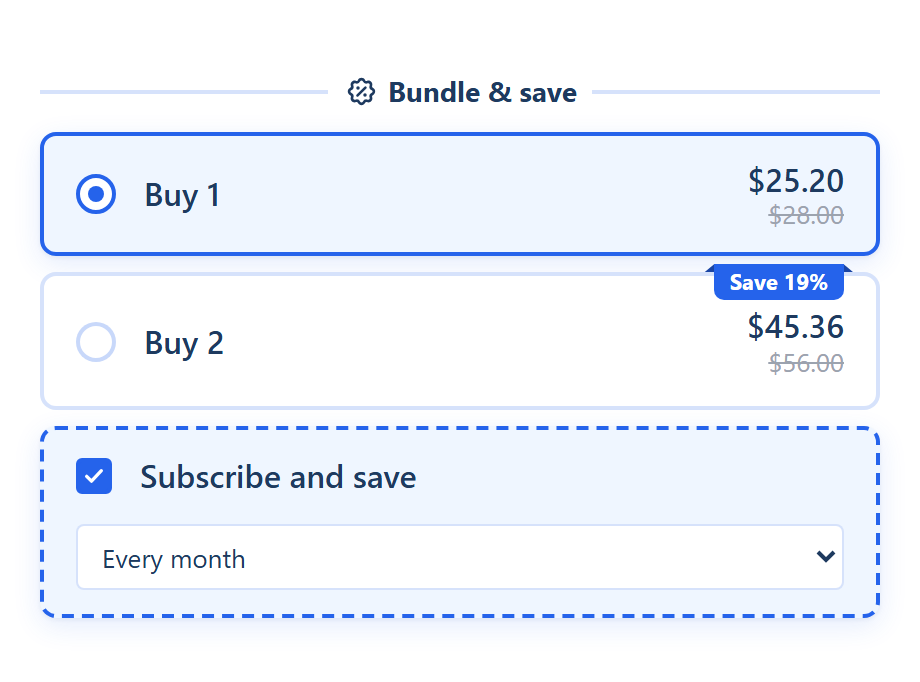
Turn on Subscriptions on the bundle's Extras tab. The widget then shows a Subscribe and save choice built from the selling plans your subscription app added to the product, and the bundle discount comes off the first subscription order only.
SMART Bundles App & Upsells is a free Shopify app for bundles, quantity breaks, free gifts and upsells.
Try it freeOn this page
Before you start
- You need a subscription app that adds selling plans to your products. SMART Bundles doesn't create plans; it uses the ones on the product.
- Only recurring plans count. Pre-order and try-before-you-buy plans are skipped, and a product without a recurring plan shows no subscription choice.
- The editor shows a card for SMART Subscriptions ("Add subscription plans to your products. This bundle shows them with its discount."), but the plans of any subscription app work.
Set it up
- Open the bundle in SMART Discounts, go to the Extras tab and switch on Subscriptions. The Subscription template on the create page starts with it on.
- Pick a Layout: Single card (with a Control of Checkbox or Switch), Stacked or Side by side (with Show first: Subscribe or One-time purchase). Set the Position: Above the offers or Below the offers.
- Edit the texts: Block title, Subscription title ("Subscribe and save"), Subscription subtitle, the one-time title and subtitle for two-card layouts, Plan label and Plan text ({{selling_plan_name}}). Variables include {{selling_plan_discount}} and {{selling_plan_price}}.
- Choose Subscription selected by default ("The first plan is picked when the page loads") and Show prices on the options.
- On the Offers tab, each offer that supports subscriptions has Allow subscription, ticked unless you untick it.
- Click Save.
How the price works
- In the widget, with a plan picked, each unit is priced at the plan's price from your subscription app, and the offer's discount comes off that. The struck price stays the one-time price.
- At checkout, turning on Subscriptions lets the bundle discount apply to subscription items. The app saves bundles with a recurring cycle limit of 1, the number of billing cycles a discount applies to (Shopify Admin API). So the bundle discount covers the first subscription order only.
- Renewals don't get the bundle discount. Any discount built into the plan itself is set in your subscription app.
Which offers can be subscriptions
| Offer | Subscription |
|---|---|
| Quantity breaks | Yes, with Allow subscription |
| Buy X, get Y | Yes, with Allow subscription |
| Mix and match | Yes, unless Shoppers pick the products is on |
| Complete the bundle | No, always one-time |
| Alternative product | No, always one-time |
| Upsell add-ons | No, always one-time |
Edge cases
- Allow subscription shows only while the Subscriptions switch is on.
- Bundles have no separate purchase-type setting. The other discount types do (Applies on subscription purchases); see Volume discounts.
- For POS, pre-orders and subscriptions together, see Bundles with POS, subscriptions and pre-orders.
More extras for the widget: Upsells and extras.
Offer Subscribe and save in your bundles
SMART Bundles App & Upsells is free on the Shopify App Store and works with your subscription app's selling plans.
Install free on ShopifyFrequently asked questions
›Does the subscriber get the bundle discount on every renewal?
No. The bundle discount applies to the first subscription order only. Renewals are priced by the subscription plan.
›Why doesn't the subscription choice show on my product?
Check that the product has a recurring selling plan, the Subscriptions switch is on, the selected offer supports subscriptions and Allow subscription is ticked on it.
›Which subscription apps work?
Any app that adds recurring selling plans to the product. The widget reads the plans from the product itself.