
How do I offer an alternative product in a bundle?
Updated · SMART Bundles App & Upsells (E-TRADE PARTNER)
Add an Alternative product offer: a card that sells a different product you pick, at its own discount, instead of the product on the page. When the shopper picks that card, Add to cart adds the alternative product, and checkout discounts only the units added through that card.
SMART Bundles App & Upsells is a free Shopify app for bundles, quantity breaks, free gifts and upsells.
Try it free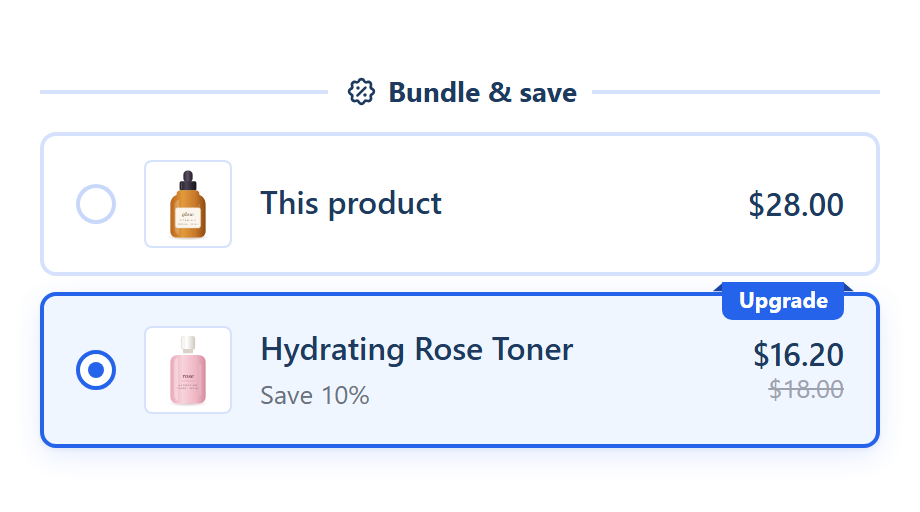
Set it up
- In SMART Discounts, click Create new discount and pick Alternative product. The template has two cards with product images: This product (Buy 1, no discount) and {{product_title}} with the badge "Upgrade" and 10% off.
- In an existing bundle, click Add another offer > Alternative product instead. The product picker opens first; cancelling it adds nothing.
- In the offer, the Alternative product row shows the product. Use Change product to swap it and Edit variants to limit which variants can be bought.
- Set Quantity, then Discount: Percentage off, Amount off each item, Fixed price per item or No discount, and the Value.
- Edit the texts. In the title, {{product_title}} shows the alternative product's name.
- Set Show this bundle on to the products the alternative should replace. See Target products and exclusions.
- Click Create or Save.
What the shopper sees
- The card shows the alternative product's image (with Add image on the offer) and title, plus a variant picker over the variants you allowed.
- Add to cart adds the chosen variant of the alternative product in the offer's quantity, instead of the page product.
- The card reads the alternative product's stock, so it shows as sold out when that product is.
- Changing the variant in the theme's picker doesn't change the alternative card; it always sells its own product.
- If the alternative product can't be loaded, for example it was deleted or isn't published, the card doesn't show.
How checkout prices it
- Only cart lines added through this card are discounted, up to the offer's Quantity. The same product added from its own page pays full price.
- Units added through the card count only for this offer. They never raise a quantity break tier or fill a Complete the bundle set.
- While the alternative product is in the cart through the card, it can unlock the offer's own gifts and upsells. See Upsell add-ons.
- The discount never raises a price: Fixed price per item does nothing on a unit that already costs less.
Limits
- Always a one-time purchase: there is no Allow subscription on this offer.
- No Show quantity selector, no Only full packs of N get the discount and no Pre-selected variant row. The quantity is the offer's Quantity.
- The card isn't hidden on the alternative product's own page, so target only the products it should replace.
- A bundle can hold several Alternative product offers; there is no fixed cap on offers. A product page still shows one bundle.
More extras for the widget: Upsells, gifts and more and Product page upsells on Shopify.
Offer the upgrade on the product page
SMART Bundles App & Upsells is free on the Shopify App Store, with the Alternative product offer and every extra included.
Install free on ShopifyFrequently asked questions
›The alternative product paid full price. Why?
The discount applies only to units added through the alternative card. The same product added from its own page or the cart pays full price.
›Does the page product stay in the cart?
Picking the alternative card adds only the alternative product. The page product is added only through its own card.